

Introduction
The internet has transformed the way people communicate, shop, learn, work, and manage their daily lives. While digital technology offers countless benefits, it also creates new risks for personal privacy and security. Every day, millions of users share information online through social media platforms, websites, mobile applications, online banking services, and cloud storage systems. Unfortunately, cybercriminals and data thieves are constantly looking for opportunities to exploit personal information for financial gain or malicious purposes.
Understanding how to protect your personal data online has become more important than ever. Personal information such as passwords, email addresses, phone numbers, banking details, and identity documents can be valuable targets for hackers. A single security mistake may lead to identity theft, financial losses, privacy violations, or unauthorized access to important accounts.
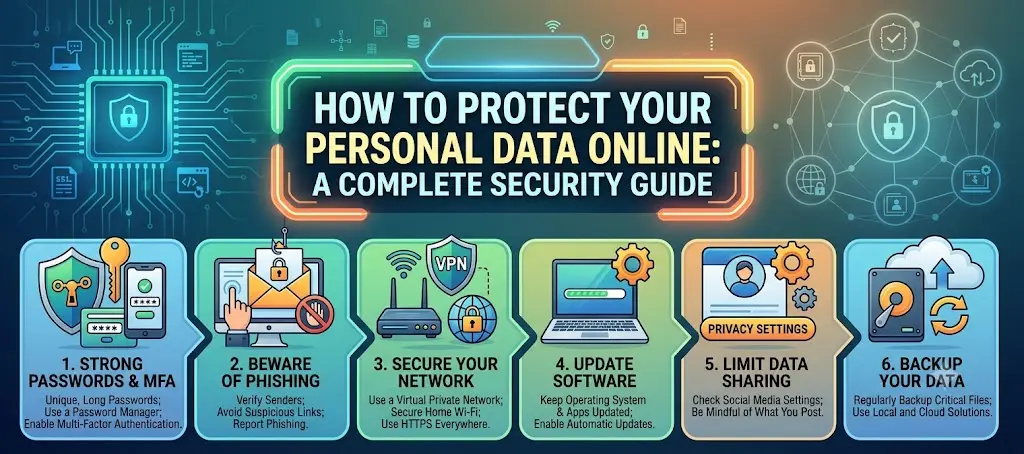
The good news is that online security does not have to be complicated. By following proven cybersecurity practices and making smart digital decisions, individuals can significantly reduce their risk of becoming victims of cybercrime. Simple actions such as creating strong passwords, enabling multi-factor authentication, recognizing phishing scams, and keeping software updated can make a substantial difference.
This comprehensive guide explains how to protect your personal data online, why it matters, practical steps you can take, common mistakes to avoid, frequently asked questions, and expert tips for maintaining strong digital security in an increasingly connected world.
What is How to Protect Your Personal Data Online?
How to protect your personal data online refers to the process of securing sensitive information from unauthorized access, misuse, theft, or exposure while using internet-connected devices and services.
Personal data includes information that can identify an individual directly or indirectly. Examples include:
- Full name
- Home address
- Phone number
- Email address
- Financial information
- Identification numbers
- Login credentials
- Medical records
- Location data
- Personal photographs
Protecting this information involves using security measures, privacy settings, safe browsing practices, and cybersecurity tools to reduce risks and maintain control over personal information.
Online data protection combines technology, awareness, and responsible digital behavior to create a safer internet experience.
Why is How to Protect Your Personal Data Online Important?
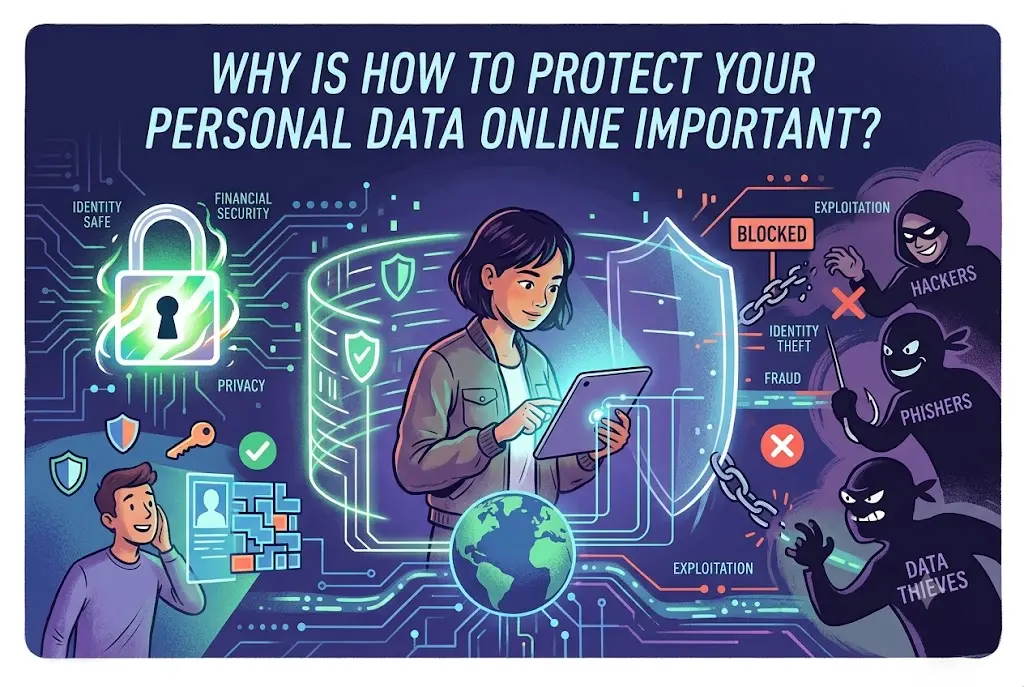
Personal data protection is essential because digital threats continue to evolve rapidly.
Prevents Identity Theft
Criminals can use stolen personal information to open accounts, make purchases, or commit fraud in someone else’s name.
Protects Financial Assets
Banking information and payment details are common targets for cybercriminals.
Preserves Privacy
Protecting personal information helps maintain control over who can access and use your data.
Reduces Cybersecurity Risks
Strong security practices minimize exposure to malware, scams, and unauthorized access.
Supports Professional Reputation
Data breaches can damage both personal and professional credibility.
Provides Peace of Mind
Knowing your information is secure allows you to use online services with greater confidence.
Detailed Step-by-Step Guide
Step 1: Create Strong and Unique Passwords
Passwords remain one of the most important security defenses.
A strong password should:
- Be at least 12 characters long
- Include uppercase and lowercase letters
- Contain numbers and symbols
- Avoid personal information
- Be unique for every account
For example, avoid simple passwords like “Password123” and create more complex combinations.
Step 2: Enable Multi-Factor Authentication
Multi-factor authentication adds an extra layer of security.
Even if someone obtains your password, they still need an additional verification method such as:
- Security codes
- Authentication apps
- Biometric verification
This significantly reduces the risk of unauthorized access.
Step 3: Keep Software Updated
Software updates often contain important security fixes.
Regularly update:
- Smartphones
- Computers
- Browsers
- Applications
- Operating systems
Outdated software can contain vulnerabilities that hackers exploit.
Step 4: Be Cautious with Public Wi-Fi
Public networks are convenient but often less secure.
When using public Wi-Fi:
- Avoid online banking
- Avoid sensitive transactions
- Disable automatic connections
- Use secure websites
Cybercriminals sometimes monitor unsecured networks to steal information.
Step 5: Recognize Phishing Attempts
Phishing attacks trick users into revealing sensitive information.
Warning signs include:
- Urgent messages
- Suspicious links
- Unexpected attachments
- Requests for passwords
- Poor grammar or spelling
Always verify the sender before responding.
Step 6: Review Privacy Settings
Many online platforms collect more information than users realize.
Review privacy settings on:
- Social media accounts
- Mobile applications
- Browsers
- Online services
Limit data sharing whenever possible.
Step 7: Limit Personal Information Sharing
Think carefully before posting personal details online.
Avoid sharing:
- Home addresses
- Financial information
- Travel plans
- Identification documents
- Sensitive personal details
Less exposure reduces potential risks.
Step 8: Use Secure Websites
Before entering personal information, verify website security.
Look for:
- HTTPS connections
- Security indicators
- Trusted website reputations
Secure websites encrypt data during transmission.
Step 9: Install Reliable Security Software
Security tools help identify and block threats.
Useful tools include:
- Antivirus software
- Anti-malware programs
- Firewall protection
- Security monitoring applications
These solutions add additional layers of defense.
Step 10: Monitor Financial Accounts
Regular monitoring helps detect suspicious activity quickly.
Review:
- Bank statements
- Credit card transactions
- Online payment accounts
Early detection often minimizes potential damage.
Step 11: Backup Important Data
Data backups protect against loss caused by cyberattacks or hardware failures.
Backup options include:
- External drives
- Cloud storage
- Secure backup services
Maintain multiple backup copies whenever possible.
Step 12: Manage Application Permissions
Many apps request access to unnecessary information.
Review permissions regularly and disable access that is not required.
Examples include:
- Location access
- Contacts
- Microphone
- Camera
- File storage
Only grant permissions that support app functionality.
Step 13: Secure Your Devices
Device security is an important part of online protection.
Use:
- Screen locks
- Biometric authentication
- Device encryption
- Automatic locking features
Physical device security supports digital security.
Step 14: Educate Yourself Continuously
Cyber threats constantly evolve.
Stay informed about:
- New scams
- Security trends
- Privacy tools
- Cybersecurity best practices
Knowledge remains one of the strongest defenses.
Benefits of How to Protect Your Personal Data Online
Protecting personal data provides numerous advantages.
Key Benefits
- Reduced risk of identity theft
- Better financial security
- Improved online privacy
- Greater control over personal information
- Enhanced account protection
- Reduced exposure to scams
- Safer online shopping experiences
- Improved confidence when using digital services
- Stronger device security
- Better protection against cybercriminals
- Reduced risk of account hijacking
- Enhanced family safety online
- Protection of professional information
- Improved long-term digital security
- Greater peace of mind
These benefits contribute to a safer and more secure online experience.
Disadvantages / Risks
Although personal data protection is valuable, some challenges may arise.
Potential Risks or Limitations
- Additional time required for security setup
- More complex login procedures
- Password management challenges
- Occasional inconvenience from verification steps
- Learning curve for beginners
- Potential lockout if credentials are forgotten
- Cost of some security solutions
- Regular maintenance requirements
- Need for ongoing awareness
- Increased responsibility for account management
Despite these challenges, the benefits greatly outweigh the inconveniences.
Common Mistakes to Avoid
Reusing Passwords
Using the same password across multiple accounts creates significant risk.
Ignoring Security Updates
Delaying updates leaves devices vulnerable to known threats.
Clicking Unknown Links
Suspicious links are a common method used by cybercriminals.
Oversharing on Social Media
Publicly sharing personal details can expose users to fraud and scams.
Neglecting Privacy Settings
Default settings may allow excessive data collection.
Using Weak Passwords
Simple passwords are easier for attackers to guess or crack.
Trusting Every Email
Not every message from a familiar-looking sender is legitimate.
Skipping Data Backups
Without backups, important files may be permanently lost.
What is personal data online?
Personal data includes any information that can identify an individual, such as names, email addresses, financial information, passwords, and location details.
Why do hackers target personal information?
Hackers often use personal information for identity theft, fraud, financial gain, unauthorized access, and other criminal activities.
How often should passwords be updated?
Passwords should be updated whenever a security breach is suspected or when important accounts require additional protection.
Is public Wi-Fi dangerous?
Public Wi-Fi can expose users to security risks if sensitive information is transmitted without proper precautions.
What is multi-factor authentication?
Multi-factor authentication requires users to verify their identity using two or more authentication methods, increasing account security.
Can antivirus software fully protect personal data?
Antivirus software is helpful but should be combined with safe online behavior, updates, and strong security practices.
What should I do if my account is compromised?
immediately change passwords, enable additional security measures, review account activity, and notify relevant service providers.
Are privacy settings important?
Yes. Proper privacy settings help control how personal information is collected, shared, and displayed online.
Expert Tips & Bonus Points
Strong online security requires consistent habits rather than one-time actions.
Expert Tips
- Use a password manager for complex passwords.
- Enable multi-factor authentication whenever available.
- Review account activity regularly.
- Avoid downloading files from unknown sources.
- Verify website legitimacy before entering information.
- Keep devices updated at all times.
- Limit unnecessary data sharing.
- Monitor privacy settings periodically.
- Use secure internet connections.
- Stay informed about emerging threats.
Bonus Points
- Separate work and personal accounts.
- Use different email addresses for sensitive services.
- Remove unused online accounts.
- Regularly audit application permissions.
- Educate family members about online safety.
Small improvements in daily habits can create significant security benefits over time.
Conclusion
Learning how to protect your personal data online is one of the most important skills in today’s digital environment. As technology continues to evolve, individuals rely more heavily on online services for communication, banking, shopping, education, entertainment, and professional activities. This increased connectivity creates opportunities, but it also introduces new security challenges that cannot be ignored.
Protecting personal information requires a combination of awareness, preparation, and consistent security practices. Strong passwords, multi-factor authentication, software updates, privacy controls, secure browsing habits, and careful management of personal information all contribute to a safer online experience. No single security measure can eliminate every threat, but combining multiple layers of protection significantly reduces risk.
It is also important to recognize that cybersecurity is an ongoing process rather than a one-time task. Threats continue to evolve, making continuous learning and adaptation essential. Individuals who remain informed and proactive are far better equipped to protect their digital identities and sensitive information.
Ultimately, taking control of your online security helps safeguard your privacy, finances, reputation, and peace of mind. By applying the strategies outlined in this guide, beginners and experienced internet users alike can build stronger defenses and enjoy the benefits of the digital world with greater confidence and security.
